
Brief History of Escape Codes

When installing Linux on a computer, I always install a program called sl. This program displays a train when you execute sl. It is not a practical program but rather a program that gives you time to think when you make a typo with the commonly used ls command in the terminal. Showing a train on the screen helps you calm down and not make other mistakes when you are in a hurry to type. That's why I install this program.

source: https://github.com/mtoyoda/sl

The terminal is a program that receives and displays two streams, stdout, and stderr, from a program. These outputs are sequential outputs and typically flow from the top left to the bottom right. However, to draw new characters on an already-used screen, a special method is needed. This special method is called escape codes.

Escape codes are a kind of promise defined in the terminal. Currently, these promises follow the standards defined in ISO 6429. However, in the past, there was no unified consensus, and each terminal had different rules. Understanding this may require knowledge of computer history.

Today, the term "terminal" means an application for the command-line interface(CLI). However, in the past, a terminal was literally the endpoint device of a computer. This terminal was connected to a mainframe computer and was responsible for its input/output. The reason that modern terminal apps are called "terminal emulators" is that they emulate these old-age terminal devices. Terminals were manufactured by various companies. For instance, ADM-3A, IBM's IBM 2260, and IBM 3270, and the VT series of DEC, which was later merged with HP. Each had its own standards for controlling terminals.
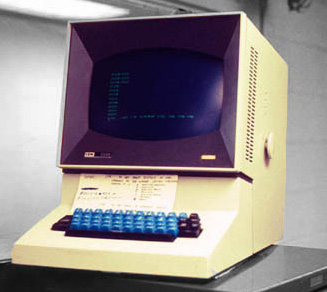
source: https://en.wikipedia.org/wiki/IBM_2260

Escape codes were not compatible across different terminals; efforts to standardize them began in the 1970s. The first standard was ECMA-48, which was first published in 1976. However, the biggest impact on modern escape codes was the VT100, produced by DEC in 1978. The VT100 introduced the Control Sequence Introducer(CSI) and various commands, including important functions such as cursor movement and scrolling, which are still used in modern terminal emulators. Based on the implementation of the VT100, ANSI released the ANSI X3.64 standard in 1979, and in 1983, ISO published ISO 6429 based on ECMA-48 and ANSI X3.64. In 1992, some codes are added. All modern terminal emulators implement escape codes based on ISO 6429.

Comments

Popular posts from this blog

Understanding Aspect-Oriented Programming with Python Examples

Object-Oriented Programming (OOP) manages code by grouping it into independent modules known as objects, emphasizing the crucial principle of Separation of Concerns. This means each object should focus on its specific responsibilities. However, real-world applications often feature functionalities that are common across multiple objects or modules, such as logging, security, transaction management, and performance monitoring. These functionalities are called Cross-cutting Concerns. Challenge of Cross-Cutting Concerns Scattering These cross-cutting concerns, when handled solely with OOP, create two major problems. The first problem is Scattering , which is when code for a specific functionality is spread across multiple places through copying and pasting. For instance, imagine adding user permission checks and logging code to every function. The same logging and permission checking code would repeatedly appear within each method. Tangling The other issue is Tangling . This refe...

Cursor Movement with CSI Sequences

Code Abbr Name CSI # A CUU CUrsor Up CSI # B CUD CUrsor Down CSI # C CUF CUrsor Forward CSI # D CUB CUrsor Backward CSI # E CNL CUrsor Next Line CSI # F CPL CUrsor Previous Line CSI # I CHT Cursor Horizontal forward Tabulation CSI # Z CBT Cursor Backward Tabulation CSI # G CHA Cursor Horizontal Absolute CSI # ; # H CUP CUrsor Position Today, we will continue from the  previous article to explore how to move the cursor using CSI sequences. The types of CSI sequences for moving the cursor can be summarized as follows. CUU, CUD, CUF, CUB These are the abbreviations for CUrsor Up, CUrsor Down, CUrsor Forward, and CUrsor Backward; as the names suggest, they move the cursor up, down, forward, and backward. They take a single number as an argument; if the argument is omitted, it is treated as 1. Thus, 0x1b[A is equivalent to 0x1b[1A . In this case, CUF and CUB move only within the same line. In other words, CUB rece...

[C++] enum class

Traditional C++ enum had several issues. To solve these problems, C++11 introduced a new feature called enum class . In this article, I will examine the problems with the traditional enum and how they are solved with enum class . First, traditional enum could not be forward-declared. The reason was that if the values in the enumerator were unknown, it was impossible to determine their size . However, enum class is treated as int if an underlying type is not specified, assigning values outside the range of an int will raise a compilation error. If you want to use values outside the range of an int , you need to specify the underlying type. Another problem with traditional enum was that the scope of enumerator names was not limited. Let's see the following example. Here, we try to represent the results of IO and Parse functions with enum s. However, this code will not compile because the Error and Ok of IOResult conflict with those of ParseResult . To resolve t...